
bgT5Call of Duty: Black Ops
Play Black Ops multiplayer over a local network. One PC runs Hostmode, the others connect to its IP address. No external master server is involved.
Latest release v0.7.0 (legacy)v0.9.0 in preparation
Capabilities
- Dedicated server: Runs a server without playing on it. From v0.9.0 with game modes, map selection and bots, set up in the launcher.
- Combat Training: Against bots, with Hostmode on your own PC. From v0.9.0, bots also play on a dedicated server.
- Player stats: Stored on the hosting PC. From v0.9.0 also in your own profile, so they follow you to any host.
Not yet verified
Present in the code, but not yet confirmed in actual play.
- Zombies — Lobbies register; a full LAN match has not been tested.
- Campaign — The singleplayer executable is patched; not tested end to end.
- Wager matches — Handled by the server code; not tested.
Releases
Not released yet. Planned changes:
- New launcher interface.
- PlayerID and nickname stored on your own PC, with import of an existing player.
- Your stats travel with you: stats, classes and playercard are kept in your profile and synced with whoever hosts. The host needs v0.9.0 too. Not tested yet.
- Find hosts on your network with one click, or host on this PC if there is none. Not tested yet.
- Choose the network you play on (LAN, Wi-Fi, VPN, Hamachi…). Not tested yet.
- The launcher finds Black Ops and installs, updates or removes bgT5 in the game folder. The original steam_api.dll is kept. Not tested yet.
- Dedicated server set up in the launcher: name, game mode, Hardcore, players, password, maps and bots. The server starts its first map by itself and can be joined right away.
- Dedicated server fixes: starting the map rotation at launch works, and a script error (for example in the bot scripts) no longer ends the match for everyone.
- No administrator rights needed for playing, Hostmode or the dedicated server. Only installing bgT5 into a game folder under "Program Files" asks once.
- The launcher checks the host before starting.
- A second player with the same PlayerID is refused, with an explanation.
- Log files for the LAN service and the server.
- Built on .NET Framework 4.8.
- Many robustness fixes.
v0.7.0
c. January 2019
This is a legacy release. A maintained version (v0.9.0) is in development.
The last known original release of bgT5: the original v0.7 files from January 2019, preserved unchanged. Date estimated from file timestamps.
- File
- bgT5-v0.7.0.zip
- Size
- 954 KB
- Served from
- downloads.bgamer.dev
SHA-256
.sha256 file670d815b4ae28fe356ad6ec82d23077138ce72f2fa359c06b617730a08a068bf
Verify in PowerShell: Get-FileHash bgT5-v0.7.0.zip -Algorithm SHA256 (upper or lower case doesn't matter)
LAN setup
For v0.7.0, the version you can download now.
Based on the v0.7.0 launcher and release files. Not yet verified step by step on a LAN.
Installation
- 1.Back up the original steam_api.dll in your Black Ops folder. The package replaces it.
- 2.Extract all files from bgT5-v0.7.0.zip into the Black Ops folder, next to BlackOps.exe and BlackOpsMP.exe.
- 3.Start bgt5launcher.exe from that folder.
Host a game
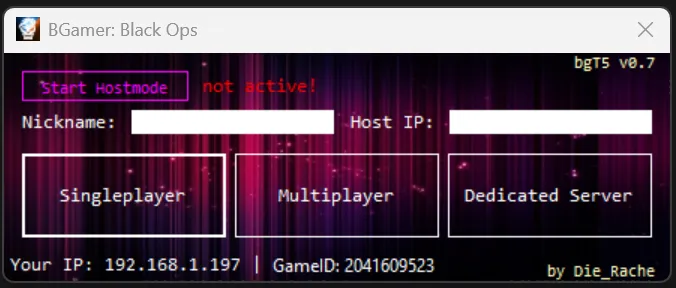
- 1.Enter your nickname.
- 2.Click Start Hostmode.
- 3.Tell the other players the IP address shown under "Your IP" at the bottom of the launcher.
- 4.Click Multiplayer.
Join a game
- 1.Enter your nickname.
- 2.Enter the host’s IP address under Host IP.
- 3.Click Multiplayer.
Network
| Port | Protocol | Purpose |
|---|---|---|
| 3074 | TCP | Game online service (on the host) |
| 27960 | not verified | Dedicated server |
| 28960 | not verified | Game traffic, default for players |
If Windows asks for network access, allow it for bgt5launcher.exe and BlackOpsMP.exe.
There is no automatic host discovery yet: players enter the host’s IP address.
LAN setup for v0.9.0
PreviewFor the upcoming release. These steps don’t apply to v0.7.0 and may change before v0.9.0 is published.
Show v0.9.0 requirements and instructions
Requirements
- Windows. All components are 32-bit and run on 64-bit Windows.
- Call of Duty: Black Ops, multiplayer build 7.0.164 and singleplayer build 7.0.152 (the current Steam builds).
- .NET Framework 4.8 — included in Windows 10 (1903 and later) and Windows 11.
- No administrator rights needed. Installing bgT5 into a game folder under "Program Files" asks for them once.
Installation
- 1.Extract the bgT5 package to any folder, for example Documents.
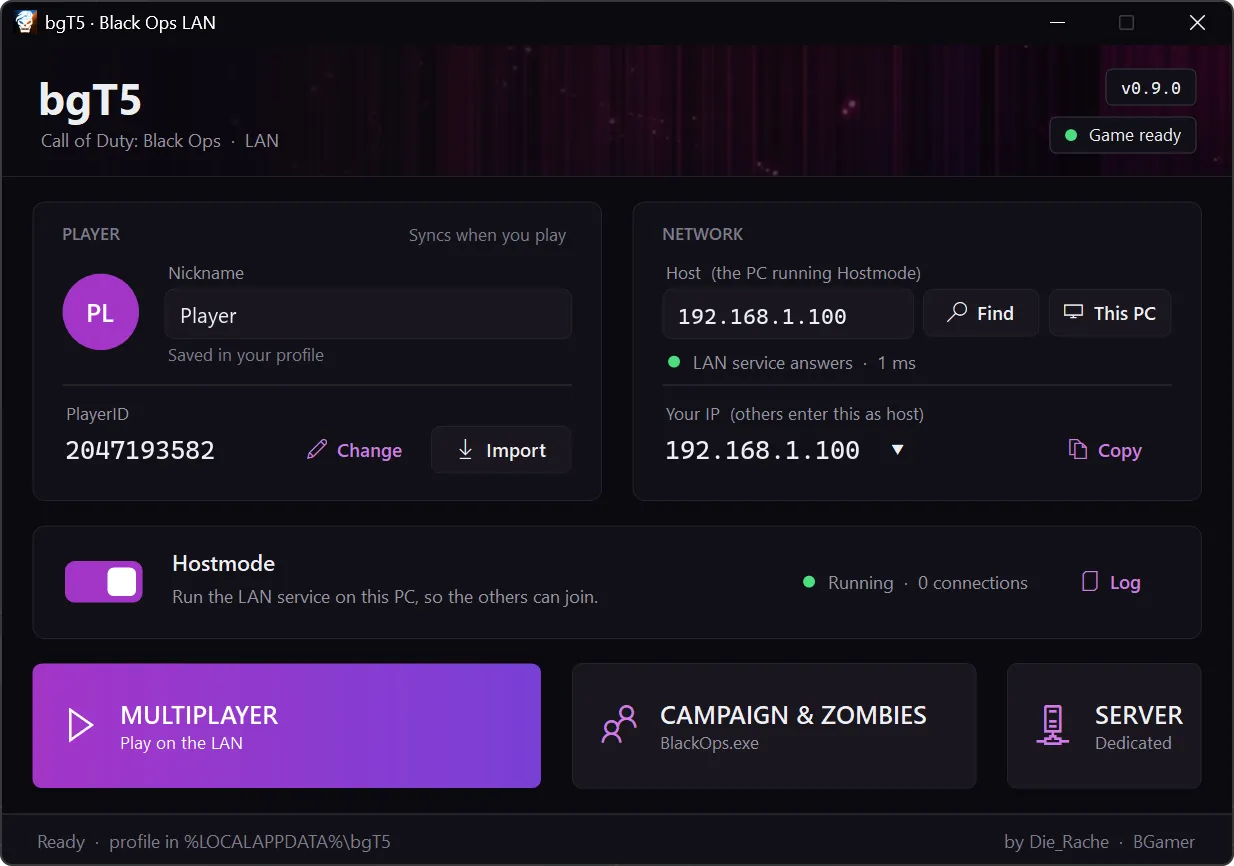
- 2.Start bgT5Launcher.exe. It finds Black Ops; if not, choose the game folder.
- 3.Click Install when the launcher offers it. It copies bgT5 into the game folder and keeps the original steam_api.dll as a backup.
Remove bgT5 restores the original files. Install, Update and Remove bgT5 are behind the game status at the top right of the launcher. Copying the package into the game folder by hand, as with v0.7.0, still works.
Host a game
- 1.Switch on Hostmode.
- 2.Allow network access if Windows asks.
- 3.If you have more than one network (Wi-Fi, VPN, Hamachi), click Your IP and choose the one you play on.
- 4.Start Multiplayer.
The other players find you with Find. You can also send them your IP; Your IP has a Copy button.
Join a game
- 1.Click Find and choose the host, or enter the host’s IP address under Host.
- 2.Wait for "LAN service answers".
- 3.Click Multiplayer.
Dedicated server
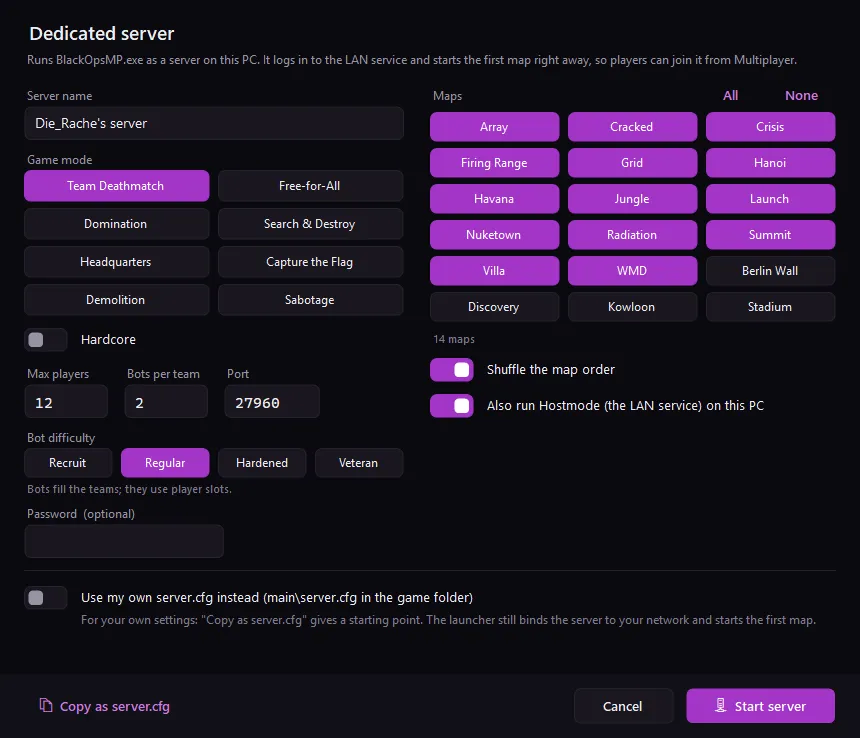
- 1.Click Server, next to Multiplayer.
- 2.Choose a server name, game mode, maps and, if you like, bots.
- 3.Click Start server. The server loads its first map; players join it from Multiplayer.
- If Hostmode isn’t running, the dialog offers to start it too: the server logs in to the LAN service like a player.
- The server uses the network chosen under Your IP.
- Use my own server.cfg starts the server with main\server.cfg from the game folder instead, and warns about common mistakes in it.
Network
| Port | Protocol | Purpose |
|---|---|---|
| 3074 | TCP | Game online service (on the host) |
| 3075 | TCP | bgT5 service: PlayerID check and stats sync (on the host) |
| 3075 | UDP | Finding hosts on the network |
| 27960 | UDP | Dedicated server (default; can be changed) |
| 28960 | UDP | Game traffic, default for players · not verified |
If Windows asks, allow bgT5Launcher.exe and BlackOpsMP.exe. A firewall rule made by hand needs all of these ports.
Known issues
- v0.7.0: player stats only exist on the PC that hosted. If someone else hosts next time, players start from zero there. v0.9.0 syncs them with the player’s profile.
- Only game builds 7.0.164 (multiplayer) and 7.0.152 (singleplayer) are supported. Other builds start without bgT5’s patches.
- IPv4 only.
- v0.7.0: no automatic host discovery; the host IP has to be entered. v0.9.0 has Find. Its broadcast doesn’t cross routers and some VPNs drop it; entering the host IP always works.
- v0.7.0: with VPNs or overlay networks (e.g. Hamachi) the IP shown may be wrong; enter the host IP by hand. v0.9.0 lets you choose the network. Not tested.
- v0.9.0: don’t run the launcher as administrator; it isn’t needed. If you sometimes do, Windows keeps two separate copies of the game’s settings and logs, and the game seems to forget settings. Stats aren’t affected.
- v0.9.0: Windows 7 needs .NET Framework 4.8 installed separately, and the launcher shows no icons there. Not tested.
- On a second monitor with different display scaling, the launcher may look blurry.
- v0.7.0: two players with the same PlayerID broke matchmaking. Fixed in v0.9.0.
- v0.7.0: installed under "Program Files" without administrator rights, settings were not saved and a new PlayerID could be created on every start. Fixed in v0.9.0.